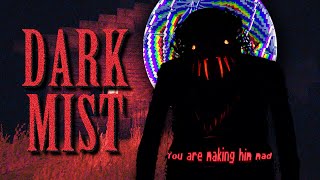
Introducing the Dark Mist Horror Mod for Minecraft
If you love the blocky world of Minecraft but crave a chilling twist, the Dark Mist horror mod delivers exactly that. Designed to transform ordinary biomes into foreboding, mist‑shrouded forests, this mod adds atmospheric tension, new mobs, and unsettling mechanics that keep players on edge. Whether you’re a veteran explorer or a newcomer seeking a fresh challenge, Dark Mist offers a unique blend of survival and psychological horror.
What Sets Dark Mist Apart?
Unlike many adventure packs that focus on new resources, Dark Mist concentrates on ambience and threat. The core features include:
- Perpetual Fog: A dense, gray mist covers the landscape, limiting visibility to a few blocks.
- Cursed Woods: Trees appear twisted, their bark emitting faint, eerie sounds that grow louder as night falls.
- New Hostile Mobs: Spectral wolves, misty wraiths, and the dreaded Dark Stalker roam the shadows, each with unique attack patterns.
- Curse Mechanics: Players who linger too long in the mist experience a gradual health drain and occasional hallucinations.
- Story Elements: Hidden journals and cryptic notes reveal a backstory about a vanished village and an ancient curse.
How to Install Dark Mist
Installing the mod is straightforward for anyone familiar with Minecraft modding:
- Ensure you have Minecraft 1.19 (or the version specified by the mod developer).
- Download the latest Dark Mist .jar file from the official mod page.
- Place the .jar file into your .minecraft/mods folder.
- Launch the game with a compatible mod loader such as Forge or Fabric.
- Activate the mod from the in‑game menu and generate a new world with the “Dark Mist” preset.
First‑Time Exploration Tips
Exploring the cursed woods can be overwhelming. Here are some proven strategies:
- Carry Light Sources: Torches, lanterns, and glowstone are essential to pierce the fog and prevent mob spawns.
- Set a Base Early: Build a small shelter near your spawn point. A secure base reduces the risk of sudden attacks.
- Watch the Time: The mist thickens after dusk. Plan your activities to return to safety before nightfall.
- Listen for Audio Cues: The mod uses subtle sound cues—rustling leaves or distant howls—to